

LinkedIn Webinar Ad Examples That Fill Seats Around the Clock
Last updated November 20, 2026
Effective LinkedIn webinar ads share four characteristics: a pain-focused headline, authoritative visual design, minimal registration friction, and a clear call to action. The best examples use Single Image or Video formats with Lead Gen Forms to pre-fill attendee details, reducing drop-off at the registration step and converting professional audiences into qualified registrants.
Table of contents
- Key takeaways
- What makes a LinkedIn webinar ad successful
- Real ad formats that drive webinar registrations
- Writing copy that stops the scroll and earns trust
- Connecting LinkedIn ads to an evergreen webinar machine
- Common mistakes and how to avoid them
- Your next step: automate the entire process
- Frequently asked questions
Key takeaways
- Single Image ads with pre-filled Lead Gen Forms achieve the lowest registration friction on LinkedIn.
- Video ads work best when the first three seconds name the pain point in professional language.
- Using LinkedIn ads to fuel an Evergreen Webinar Engine turns one-time events into 24/7 sales machines.
- Just-in-time scheduling lets registrants join immediately after clicking, capturing impulse interest.
What makes a LinkedIn webinar ad successful
A high-performing LinkedIn ad starts with a pain-focused headline, pairs it with authoritative visual design, minimizes registration friction, and uses a path that feels native to the platform. LinkedIn remains the primary platform for B2B webinar promotion because its professional targeting reaches decision-makers inside their daily workflow, not in a scroll session they'll forget.
Most advice stops at creative and never explains what happens after the click or how to sustain momentum beyond a single event date. That gap costs you registrants and, ultimately, customers. This article shows you real ad patterns, then connects them to an AI-powered funnel that runs continuously.
The promise is simple: you can build an ad that attracts serious professionals, then use the Evergreen Webinar Engine to turn that traffic into a repeatable, 24/7 sales asset instead of treating every webinar as a one-time event. Once the content is automated and the funnel builds itself, you stop trading time for registrations and start building a machine that fills seats around the clock.
Real ad formats that drive webinar registrations
The three formats that deliver the highest webinar registration rates on LinkedIn are Single Image, Video, and Carousel ads, each with distinct strengths for professional audiences.
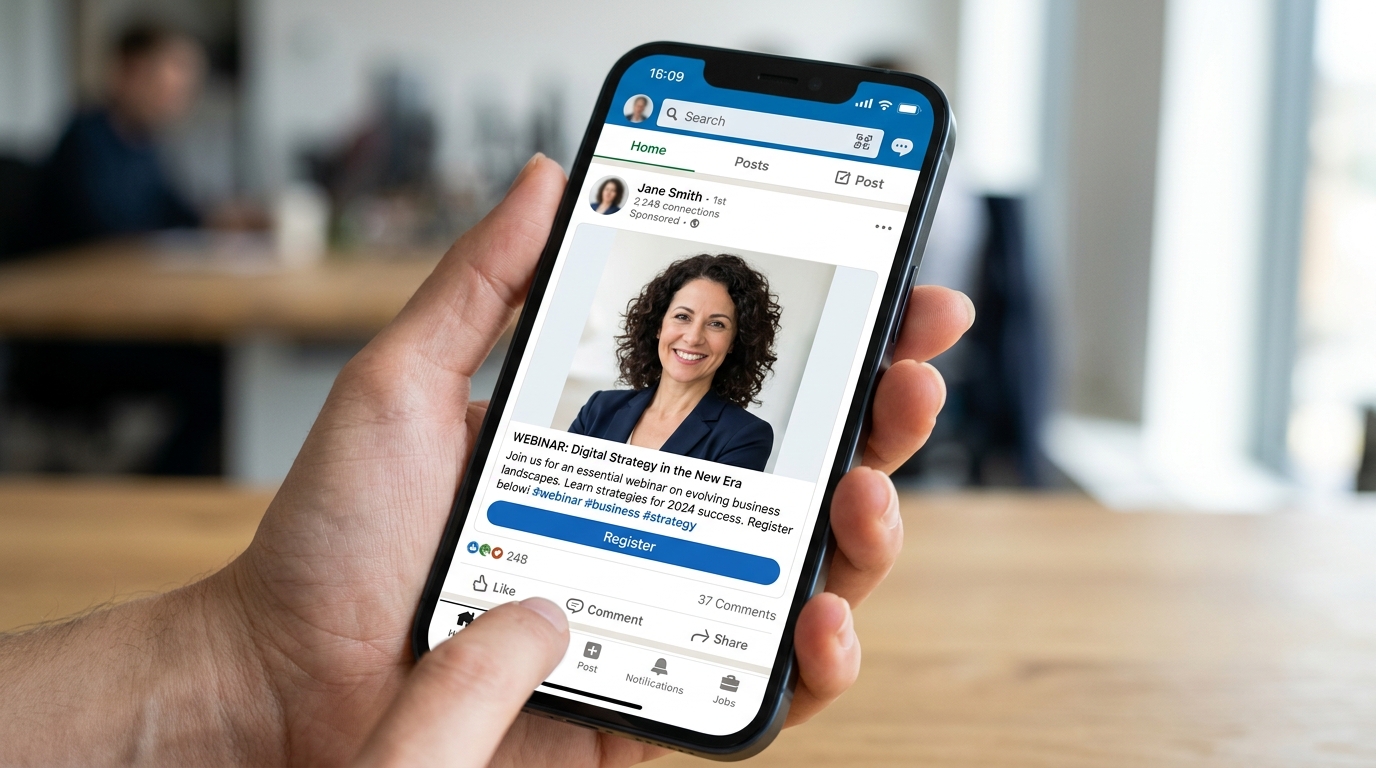
Single Image ads pair a clean hero shot with a one-line value statement and a Lead Gen Form button. Lead Gen Forms are LinkedIn's native feature that pre-fills user data (pulling name, job title, company and email from the user's profile) so they can register with one tap. This cuts registration time and increases conversion by reducing the number of fields and clicks between scroll and confirmation.
Video ads demand that the first three seconds name the pain in the viewer's own words. Keep video under 60 seconds and end with a registration prompt overlay. If you open with a logo animation or generic welcome, you've already lost the scroll. Start with the problem statement in plain language. Then present the solution.
Carousel ads are less common for webinars but useful when showcasing multiple speakers or case outcomes. Each card reinforces authority without overloading the message. Use carousels sparingly, only when you have distinct proof points to cycle through, because B2B audiences prefer clarity over swipe interactivity.
Properexpression, underscoring why post-ad funnel automation matters more than the ad itself. If you're running beautiful creative but losing registrants at the landing page or failing to convert them into show-ups, the ad did its job and your funnel didn't.
Practical rule: The fewer fields and clicks between scroll and confirmation, the higher your registration rate. Use LinkedIn Lead Gen Forms to cut friction by 50 percent or more.
Writing copy that stops the scroll and earns trust
Start with a pain-point headline that mirrors the language your audience already uses internally, not marketing jargon. If your buyers say "we're wasting pipeline on no-shows," write that. If they say "our sales team is burning out doing demos," write that. The headline should sound like something they'd say to a peer, not something you'd say in a deck.
Highlight authority without arrogance. Cite credentials, case numbers or recognizable client logos in the visual, then let the offer speak for itself. Saying "we've run 300+ webinars" is evidence. Saying "the world's most trusted webinar solution" is noise.
Use a clear, benefit-driven subheadline that tells the reader what they'll walk away knowing or doing after the webinar. "Learn the three-step framework to cut demo time in half" beats "Join our exclusive masterclass."
Include social proof sparingly. One testimonial sentence or a registered-attendee count is enough. Too much proof looks defensive, as if you're trying to convince someone who wasn't already interested. If the ad targeted correctly, the headline and subheadline did the heavy lifting.
End every ad with one call to action. Never offer two paths or two registration buttons. Give a professional audience a choice, and you give them permission to skip both.
Connecting LinkedIn ads to an evergreen webinar machine
The Evergreen Webinar Engine transforms LinkedIn ad traffic into continuous sales by routing clicks to automated sessions that run around the clock, eliminating the need to coordinate live events or worry about time zones. Instead of running ads in the week before an event, you run them all year and route clicks to a funnel that never stops working.
The distinction between ads for a one-time live event and ads that feed a 24/7 automated funnel comes down to language and logistics. Live-event ads emphasize the date and urgency. Evergreen ads emphasize the outcome and immediate access, removing the calendar friction entirely.
Just-in-time scheduling is the key to maximizing impulse registration. A LinkedIn user clicks your ad and can join a session starting within minutes, eliminating the need to remember a date or add it to their calendar. That immediate gratification captures buyers at the moment they're interested, not three days later when the impulse has passed.
The technical setup works like this: ad clicks route to a page designed to convert registrants quickly, then immediately schedule the user into the next automated session. The AI Presentation Builder creates the webinar slides and script in under 10 minutes, so the funnel content matches the professional quality of the LinkedIn ad creative. You're not faking professionalism with one part of the funnel and dropping the ball with another.
We integrate email and SMS follow-up sequences automatically, ensuring high show-up rates without manual effort. The moment someone registers, the system nurtures them through to attendance with reminders, benefit recaps and one-click access links.
Using LinkedIn's professional targeting to fill automated webinar seats means you can run ads continuously without worrying about live availability or time zones. A VP in London and a director in San Francisco both get the same high-quality experience, delivered at the moment they're ready to watch. See our guide to building strong registration pages in conversion-optimized landing page designs.
Common mistakes and how to avoid them
Linking to a generic landing page instead of using Lead Gen Forms adds unnecessary friction and lowers conversion. If LinkedIn offers a native tool that removes two steps, use it.
Writing ad copy that sounds like a pitch deck instead of a peer conversation kills engagement. B2B audiences skip hype and want specifics: numbers, timeframes, outcomes. Replace "transform your strategy" with "cut demo time by 40 percent."
Running ads only in the week before the event wastes budget. Properexpression, so start early and retarget consistently. The buyer who scrolls past your ad today might register after the third impression next week.
Ignoring post-registration follow-up is the fastest way to burn ad spend. Properexpression, but only if the funnel nurtures registrants through to show-up. An email sequence that reminds, reinforces value and removes obstacles will triple your attendance.
Failing to test Single Image versus Video is another missed opportunity. Both formats work, but audience response varies by industry and seniority level. Allocate budget to test before scaling. Let the data dictate the winner rather than guessing based on what you like.
Watch out: Running ads only in the week before the event wastes budget. The average B2B conversion is influenced by multiple touchpoints, so start early and retarget consistently.
Your next step: automate the entire process
Our AI-powered webinar platform handles everything from slide generation and funnel building to live events and 24/7 evergreen automation, so you never need to choose between running ads and managing backend logistics. The AI Presentation Builder generates your webinar content in under 10 minutes, and the Evergreen Webinar Engine turns that content into a repeatable, 24/7 sales asset.
A great LinkedIn ad is only half the equation. The funnel that follows determines whether registrants become customers. If you're overwhelmed by the tech of setting up ads, landing pages, webinar content and follow-up sequences, you're not alone, and you don't need to solve each piece separately.
You set it up once, and it fills seats continuously while you focus on closing deals. If you're ready to stop trading time for registrations, call 760-253-1477 to get started, or visit the platform to start your 7-day free trial. The setup takes under 10 minutes, and the results compound every day the machine runs.
Frequently asked questions
What are good examples of LinkedIn webinar ads?
Successful ads use Single Image or Video format, a pain-focused headline, and LinkedIn Lead Gen Forms to pre-fill registration details. The best examples name the audience's problem in the first line, show authority through credentials or case numbers, and offer a single, frictionless registration path.
How do I create effective LinkedIn ads for webinars?
Write a headline that mirrors the language your audience already uses, not marketing jargon. Use Lead Gen Forms to reduce friction, include one clear call to action, and test Single Image versus Video to see which format your audience prefers.
What is the best ad format for webinars on LinkedIn?
Single Image ads paired with Lead Gen Forms achieve the lowest registration friction. Video ads work when the first three seconds name the pain point and the total runtime stays under 60 seconds.
How much should I spend on LinkedIn ads for a webinar?
Start with a test budget that lets you gather at least 500 impressions per ad variation. Scale spend only after you identify the winning format and confirm that your post-click funnel converts registrants into show-ups.
How do I target the right audience for my webinar on LinkedIn?
Use LinkedIn's professional targeting filters: job title, seniority, industry and company size. Layer in interest or group membership if available, and exclude past attendees or customers if your goal is net-new leads.
Can I use LinkedIn ads for an automated or evergreen webinar?
Yes. Write ad copy that emphasizes the outcome and immediate access instead of a fixed date. Route clicks to a just-in-time scheduling page so registrants can join a session starting within minutes, then use the Evergreen Webinar Engine to simulate live engagement 24/7.
Should my LinkedIn ad link to a landing page or use a Lead Gen Form?
Use a Lead Gen Form whenever possible to pre-fill user data and reduce friction. Link to a landing page only if you need to show video testimonials, case studies or other proof that cannot fit inside the ad unit itself.
